Global chrome
Always on the top bar of every primary mode.
| PiDI | Brand. Not a button. |
|---|---|
| < BACK | Previous mode when there is history. |
| HOME | 5×3 launcher for every performance mode (twelve tiles, no scroll). |
| POWER | Shutdown / reboot / SCREEN OFF / blanking timeout. Kiosk-safe — no desktop power UI. |
| SYN SEQ PAD KAO CHD | Jam shortcuts. Visible while you are in those five modes. |
Audio lives in jambox-engine. This UI is a thin client over a Unix socket (or TCP on a host). Recapture after UI changes: ./scripts/capture-pidi-docs.sh.
HOME
Launcher. New screens get a tile here instead of another persistent tab.

| SYNTH / DRUMS / SEQ / PADS / KAOSS / CHORDS | Performance cluster. SYN SEQ PAD KAO CHD also stay as jam tabs. |
|---|---|
| SONGS | Play Standard MIDI Files locally and/or USB→DIN. |
| PRESETS | Eight named slots for a session snapshot, plus FACTORY. |
| FX | Inserts plus keys vs kit trims, and EP-style punch-in pads. |
| MIX | LIVE / KIT / SEQ buses and per-pad clip faders. |
| MAP | MIDI channel remap: tap an input channel, then pick one or more outputs. |
| SETTINGS | WIFI, UPDATE, FONT, plus tiles through to LOG and PORTS. |
SYNTH
Morphing wavetable voice, CRT scope, on-screen keys.

| A / B | Morph endpoints. Tap either to open the MORPH picker for that side. |
|---|---|
| SWAP | Flip A↔B and invert the blend so the sound stays put. |
| VIB | Opens the vibrato overlay (depth, rate, wheel vs always-on). |
| SAVE | Bake the current morph + drive/tone + delay/reverb/flanger sidecar into user-wavetables/. No name pad — it writes an auto name. |
| OCT − / + | Transpose the on-screen keyboard. |
| MORPH TONE LEVEL ATK REL FLANGE RATE | Vertical sliders. Morph is A→B; tone is the Chamberlin LPF. FLANGE is voice flanger mix; RATE is the flanger LFO speed. |
| Scope | Live picture of the morph cycle. |
| Keys | One octave. Hidden when a USB keybed is connected (MPK, Keystep, …); sliders and the scope grow into that strip. Stay visible for DIN interfaces (U2MIDI). Notes record into SEQ / pad REC while those are armed. |
MORPH picker
Opened from SYNTH → A or B. One grid assigns both endpoints (A, then B).
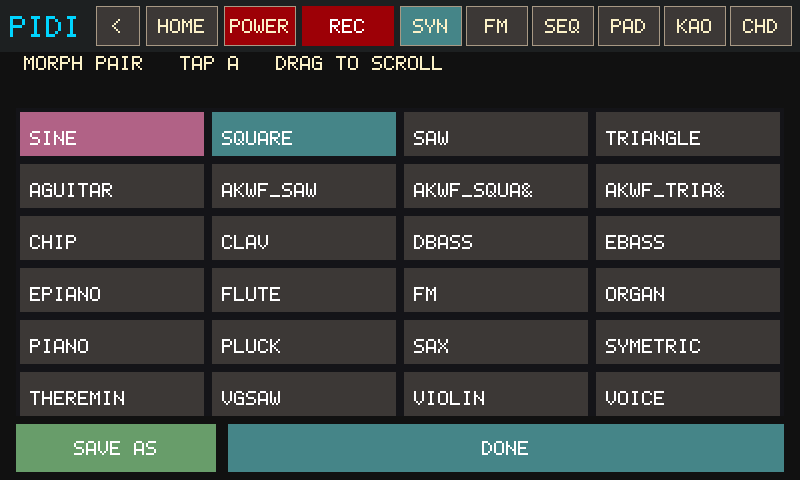
| Voice tiles | Tap to assign the armed side. Drag the grid to scroll the bank (builtins + AKWF + user). |
|---|---|
| SAVE AS | Bake the current blend to a new user wavetable + .fx.json sidecar (includes flanger mix). |
| DONE | Keep the pair and return to SYNTH. |
VIBRATO
Opened from SYNTH → VIB.
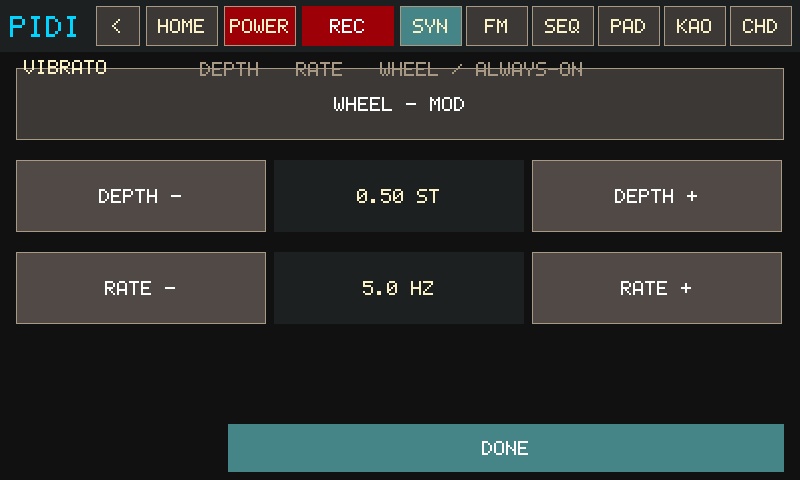
| WHEEL / ON – ALWAYS | Follow CC1 (joystick) or run at the set depth with no wheel. |
|---|---|
| DEPTH − / + | 0–2 semitones. |
| RATE − / + | 1–9 Hz. |
| DONE | Back to SYNTH. |
DRUMS
Its own HOME tile (not a SYNTH overlay). 16 analog-style voices, per-drum note repeat, and WAVE edit.
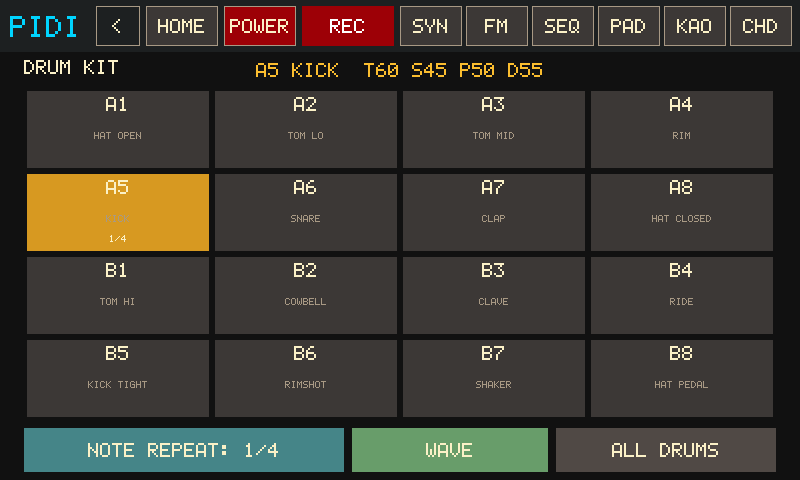
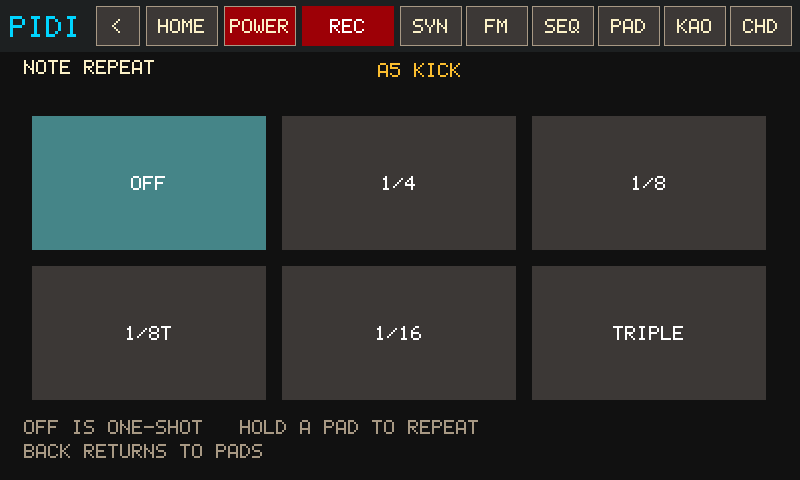
| Pad grid | Tap to play / select. Pads with note repeat show a teal tint plus 1/4 · 1/8 · TRIP. |
|---|---|
| NOTE REPEAT | Per selected drum (or ALL DRUMS). OFF is one-shot. HOLD a pad (screen or MPK) to repeat at 1/4, 1/8, 1/8T, 1/16, or TRIPLE — hits stay on that beat grid. |
| LOCK / HOLD | HOLD (default): repeat while the pad is down. LOCK: tap a pad to start, tap again to stop. Locked repeats keep the same grid after you let go. PANIC / NOTES OFF clears latched lanes. |
| WAVE | Opens the one-shot scope + TONE SNAP PITCH DECAY sliders. |
| ALL DRUMS | Point macros / note repeat / insert FX at the shared kit bus. |
Drum hits record into SEQ / pad REC while those are armed.
SEQ
Free-timing overdub looper. First take is the backbone; later REC stacks layers.

| REC BACKBONE / OVERDUB | First press records the backbone. Press again to lock loop length and play. Later REC is an overdub take. Armed REC also captures SYNTH keys, drums, CHORDS, and incoming MIDI — you can leave SEQ while it records. |
|---|---|
| PLAY | Start playback (needs a backbone). |
| KEEP / DROP / UNDO | Commit, discard, or peel the last layer. |
| LEN ×2 / LEN ÷2 | Double or half the loop. |
| WRAP / EXTEND | WRAP stays inside the length; EXTEND can grow the cycle while overdubbing. |
| BEEP | Optional clave click at the start of each loop so a four-on-the-floor (or any even groove) still tells you where 1 is. Playback only — SAVE SEQ and >PAD do not bake it in. |
| >PAD | Arm, then tap a PADS slot to copy the loop onto a phrase. |
| − BPM / + BPM | Tempo. Chrome also shows BPM. |
| QNT | BAR / BEAT / OFF launch/stop grid (shared with PADS). Default BAR so layered takes lock to the clock. |
PADS — PLAY
Launch clips. Empty pads only select; they do not arm record.

| Grid A1–B8 | Tap a filled pad to launch / toggle. Green = sounding, blue/teal = clip ready, gray = empty. LOOP vs ONE is the subtitle. |
|---|---|
| QNT | BAR / BEAT / OFF. Two pads hit in the same bar (or beat) start together on the engine clock. Same control on SEQ. |
| STOP | Stop every playing phrase. |
| OUT | LOCAL / USB / BOTH (on the edit footer; PLAY keeps routing). |
PADS — EDIT
Record into empty pads and trim per-clip voice / channel / gain.

| PLAY / EDIT | Toggle views. |
|---|---|
| REC / STOP | Arm record on the selected empty pad, or finish a take. CHORDS and SYNTH notes land here while REC is on. |
| CLEAR | Arm, then tap a pad to erase it. |
| MODE | Arm, then tap a pad to toggle LOOP ↔ ONE-SHOT. |
| FLW / LOCK | Follow the live morph, or lock a voice snapshot. |
| SYN / MIDI | Local soft-synth vs MIDI-only for that pad. |
| CH* | Force an out channel or keep the recorded one. |
| V− / V+ | Per-pad gain. |
KAOSS
XY pad in the Kaossilator / Kaoss Pad tradition. Scale notes on the onboard synth and/or factory CCs to a hardware synth.
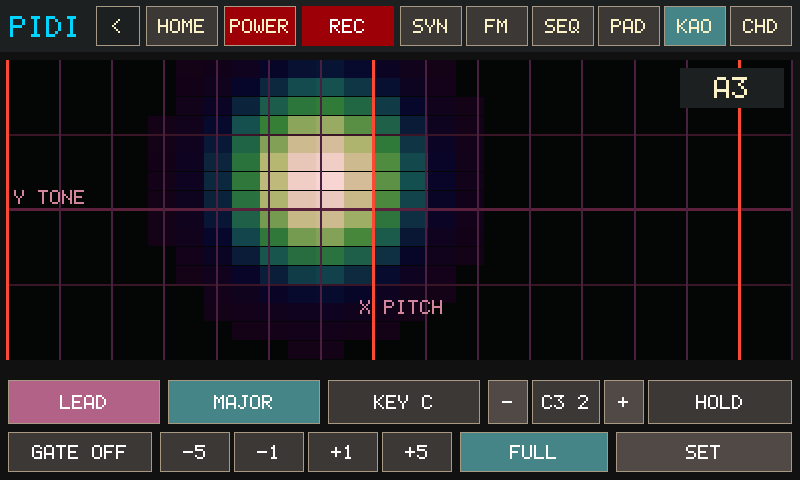
| XY pad | Press / slide / lift. X along the bottom, Y up the left. Default viz is CELLS (12×7 LED field); GLOW is the soft bloom in this capture. Set that in ⚙. |
|---|---|
| PROG / SCALE / KEY / OCT / GATE | Each opens a tap-to-pick grid. GATE arps note programs only. |
| HOLD | Freeze the last XY after lift (Kaossilator-style). On an FX program it also keeps the wet mix. |
| BPM −1 / +1 / −5 / +5 | Gate arp tempo. |
| FULL | Hide the control strip so the pad fills the body. Hold still on the bottom edge (~0.7s) to leave. |
| SET | KAOSS settings (pad FX destination, viz, color, OUT, channel). The button shows the current pad-FX target (SET VOX / SET DRM / SET BOTH). |
Factory MIDI matches the original Kaoss Pad: CC#12 = X, CC#13 = Y, CC#92 = pad touch. Playing while SEQ is recording captures the pad notes.
KAOSS programs
PROG is two families. NOTE (teal) programs play the scale on X. FX (orange) programs do not start a note — they sculpt the synth voice (not the drum kit). The PROG button and each picker tile are color-coded and tagged NOTE / FX.
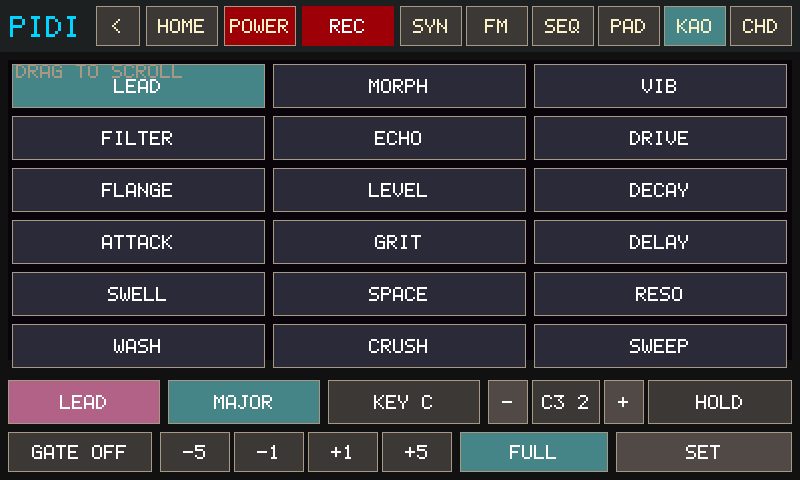
Note programs — X = scale pitch
| LEAD | Y = TONE (sticky LPF). |
|---|---|
| MORPH | Y = MORPH (A→B, sticky). |
| VIB | Y = vibrato depth. Lift restores the previous depth. |
| WAH | Y = tone oscillation rate (auto-wah LFO on the filter). Bottom = slow sweep, top = fast wobble. Lift restores the sticky tone. |
| BEND | Y = pitch bend about the pad midline (center = unison, ±12 st). Curated. |
| FLANGE | Y = flanger mix. Curated. X plays the scale; no rate wobble on this pad. |
| LEVEL / DECAY / ATTACK / GRIT / DELAY | Y = volume / release / attack / drive / delay mix. Behind SHOW ALL. |
FX programs — no pitch from the pad
| FILTER | X = TONE, Y = MORPH (momentary unless HOLD). |
|---|---|
| ECHO | X = delay time, Y = delay mix. Lands on the SET pad-FX target (voice / drums / both). |
| DRIVE | X = drive, Y = reverb. Same pad-FX target as ECHO. |
| WAH FX / VIB FX / BEND FX | Same Y maps as the NOTE twins, but no pad tone — use over a GATE arp, HOLD drone, or SEQ. Curated. |
| FL RATE | X = flanger rate, Y = flanger mix. Curated FX twin of FLANGE. |
| LVL FX / DEC FX / ATK FX | SHOW ALL FX twins of LEVEL / DECAY / ATTACK. |
| SPACE / RESO / WASH / CRUSH / DUB / SWELL | SHOW ALL extras — delay/reverb/drive pairs. Lift restores unless HOLD is on. |
Every NOTE effect has an FX path. FILTER / ECHO / WAH FX and the other orange tiles do not play notes. If you open them on an empty pad you hear silence. Latch a sound first (or run a GATE arp / HOLD), then sculpt. Pad FX follows SET → VOICE / DRUMS / BOTH. For different reverb on keys vs kit, use FX MODE sliders (TARGET: VOICE vs TARGET: DRUMS) — those inserts are independent.
KAOSS scales
Opened from KAOSS → SCALE. Tap a full name instead of cycling three-letter codes.
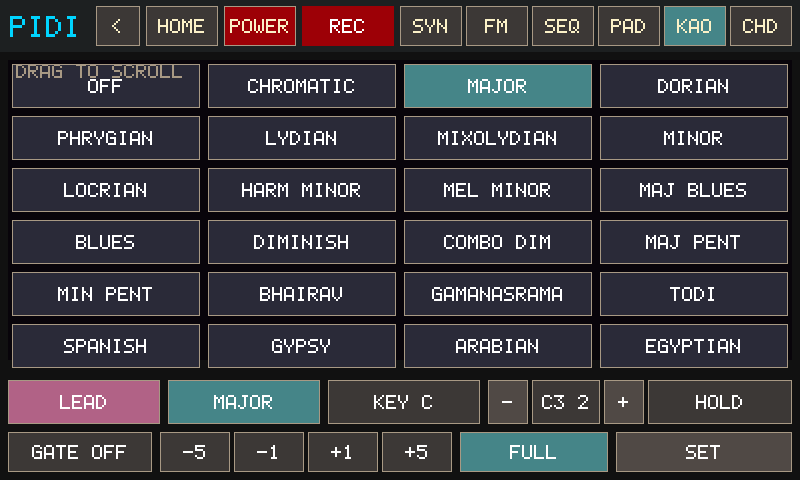
| Scale tiles | Current scale is highlighted. Drag to scroll. |
|---|---|
| CURATED / ALL SCALES | Toggle from KAOSS ⚙ (SHOW ALL). |
KAOSS full pad
Opened from KAOSS → FULL. The pad takes the body of the 800×480 panel; top chrome stays.
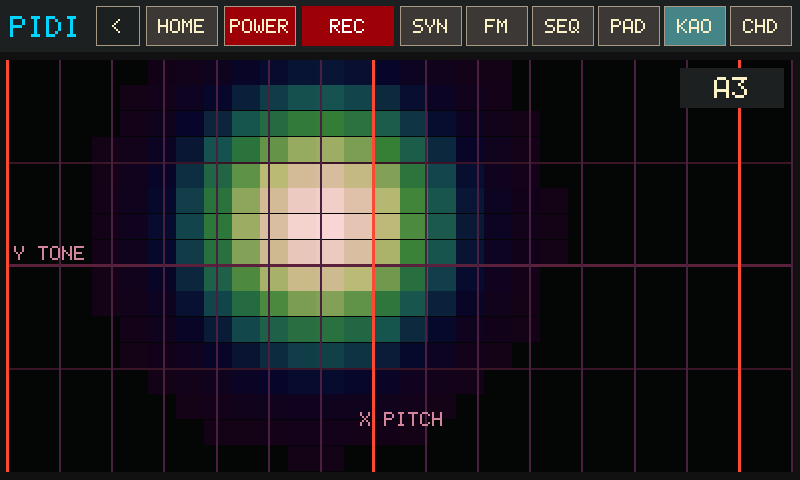
| Pad | Same XY play, just larger. HOLD / gate / viz still apply. |
|---|---|
| Bottom edge | Park a finger on the bottom of the screen and stay still about 0.7s to exit. |
KAOSS settings
Opened from KAOSS → SET. Scroll for OUT and MIDI channel.
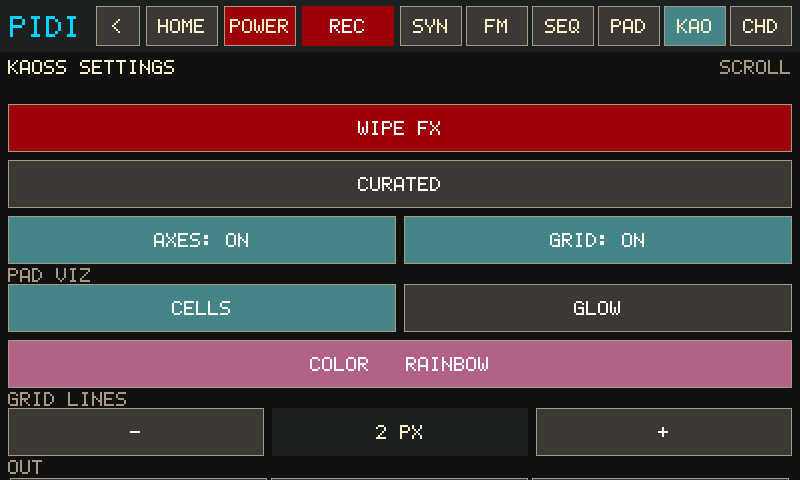
| VOICE / DRUMS / BOTH | Where pad FX (echo, reverb, drive, flange) lands. Default VOICE — kit stays dry. DRUMS writes the shared kit bus. BOTH writes the same XY to both inserts. Different amounts still come from FX MODE sliders. |
|---|---|
| WIPE FX | Zero voice + kit + leftover bus wet and restore tone/morph defaults. |
| CURATED / ALL SCALES | Short vs factory PROG and SCALE lists. |
| AXES / GRID | X/Y labels and grid lines on the pad. |
| PAD VIZ | CELLS (LED matrix) or GLOW (soft bloom). |
| COLOR | Opens the shared color picker (CELLS and GLOW). |
| GRID LINES − / + | Stroke width 1–5 px. |
| OUT / CH | LOCAL / USB / BOTH and MIDI channel 1–16 (scroll down). |
KAOSS pad color
Opened from KAOSS ⚙ → COLOR. Applies to CELLS and GLOW.
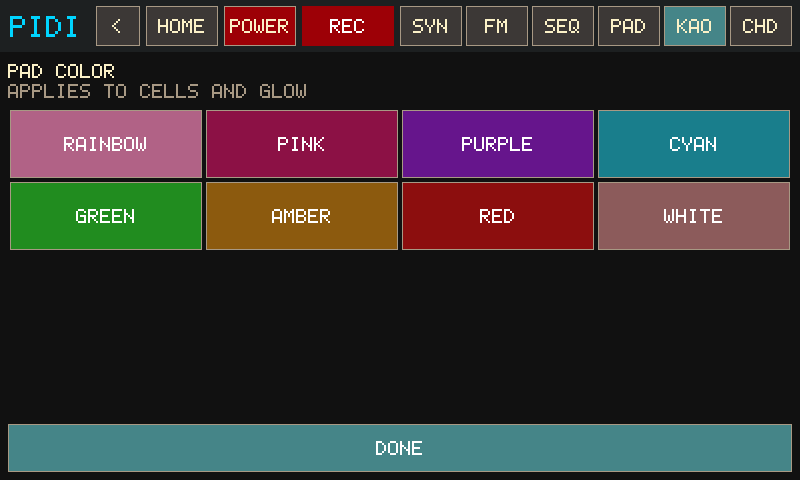
| RAINBOW | Hue follows X. |
|---|---|
| Named swatches | Fixed hue/sat for the field and bloom. |
| DONE | Back to KAOSS settings. |
CHORDS
Omnichord-style circle-of-fifths buttons, wide harp strumplate with vertical pluck lines, harmonic palette. Jam tab CHD.
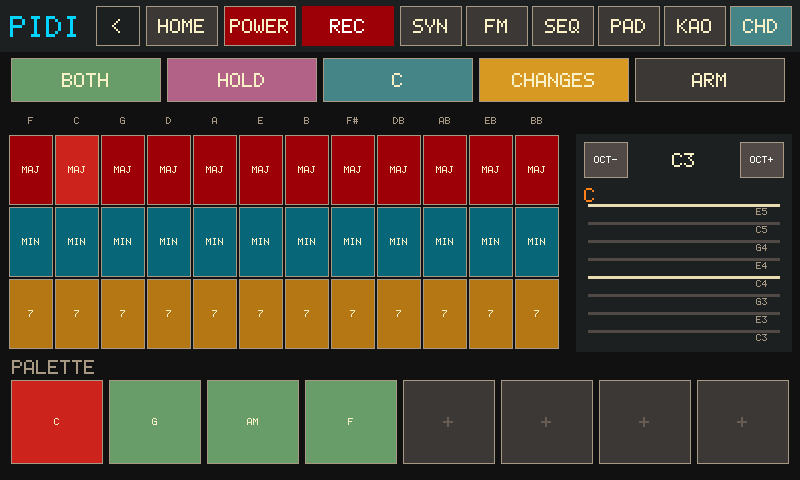
| 12×3 grid | Columns F C G D A E B F# Db Ab Eb Bb. Rows MAJ / min / 7. Same-root and neighbour combos give M7, m7, dim, aug, sus4, add9. Lifting a combo together keeps it on the strum pad — fingers do not have to come up in the same instant. |
|---|---|
| STRUM | Wide plate under the fifths grid. Slide to harp (low→high); buttons/palette play a block voicing (piano-style). |
| PALETTE | 2×4 grid to the right of the fifths buttons. Empty tap or ARM stores the current chord. Filled press plays that chord as a block (MOM while held, HOLD latches). |
| HOLD / MOM | HOLD keeps the last block chord ringing (memory). MOM only sounds while your finger is down. |
| OUT | LOCAL / USB / BOTH through the current synth voice (or MIDI out). |
| KEY / PROGS / ARM | Pick the key, load a named progression into the palette, or arm the next empty slot. |
While SEQ REC or pad REC is armed, chrome shows REC {chord} or PAD {chord}. Block chords and strums record the same way synth keys do. Switch to CHD without stopping the take — the sequencer lives on the kiosk, not the page.
CHORDS — PROGRESSIONS
Named progressions in the chosen KEY, loaded into the palette.
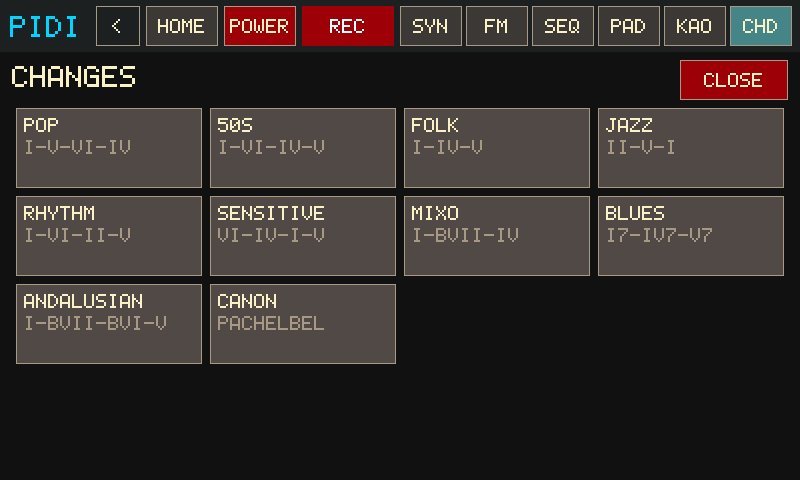
| Pop / 50s / Folk / Jazz | I–V–vi–IV, I–vi–IV–V, I–IV–V, ii–V–I. |
|---|---|
| Rhythm / Sensitive / Mixo / Blues | I–vi–ii–V, vi–IV–I–V, I–bVII–IV, I7–IV7–V7. |
| Andalusian / Canon | i–bVII–bVI–V, Pachelbel. |
| CLOSE | Back without changing the palette. |
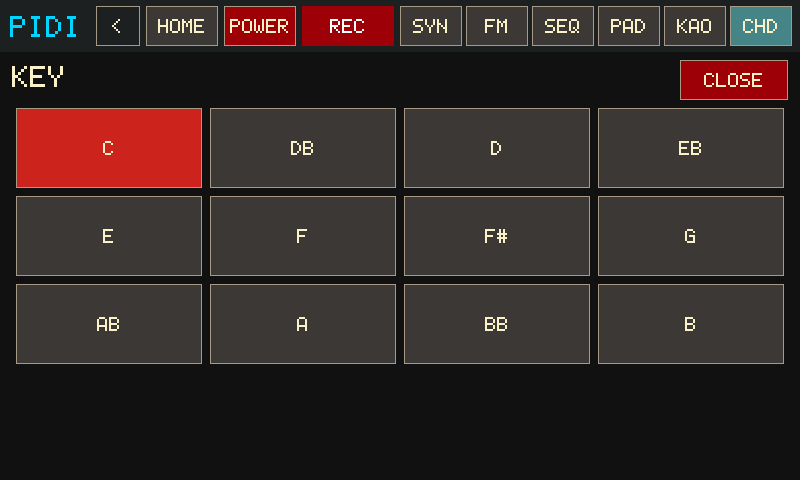
CHORDS — KEY
Sets the tonic PROGS uses when filling the palette.
SONGS
Browse songs/ MIDI files, set tempo, play locally and/or USB MIDI out. Open the visualizer to watch notes fall onto a keyboard that lights as they sound.

| List | Tap a .mid row; flick to scroll the full-height list. |
|---|---|
| PLAY / STOP | Start or stop song playback. |
| VIZ | Fullscreen falling notes of the selected SMF. Keys and drum pads light as notes sound. The top strip is the whole file; a sliding frame marks the span currently on the roll. |
| SAVE SEQ | Export the current sequencer arrangement into songs/. |
| OUT | LOCAL / USB / BOTH. |
| LOOP | Repeat the file when it ends. |
PRESETS
Eight touch slots for a named session snapshot.

| Slots 1–8 | Tap to select. LOAD / SAVE / DELETE the slot. FACTORY resets synth defaults. |
|---|
Autosave also keeps settings.json so a reboot returns where you left off.
FX
Left side is the insert rack (BUS / VOICE / DRUMS). Right side is eight EP-style punch-in pads on the master bus. LEVEL, DRUMS, and MIC are the keys / kit / capture trims.

Inserts
| TARGET: BUS / VOICE / DRUMS | Which insert the sliders edit. Bus is the master wet after keys + drums are summed. |
|---|---|
| DRIVE DELAY REVERB FLANGE | Insert mix. Voice flange mirrors SYNTH FLANGE; bus flange is independent global wet. |
| LEVEL | Melody / keys bus. Same fader as SYNTH LEVEL. Does not duck the kit. |
| DRUMS | Shared kit bus trim. Balance drums against melodies here without opening DRUM MODE. |
| MIC | USB mic / line capture onto the master bus (before punch-in). Starts at 0 so a headset cannot feedback until you open it. Same fader as MIX MIC. |
Punch-in pads
Punch-in sits after keys + drums + clips + the bus insert, and before the output limiter. Songs, SEQ, live keys, and the kit all hear it. Armed pads stay on when you leave FX.
Each pad stores an amount and an on/off. Slide vertically to set the amount whether the pad is armed or not — top of the pad is full. Tap to arm or disarm at that stored value. CLEAR and panic only turn pads off; they do not reset the sliders. Fresh pads start at 0% so they match parked MPK knobs.
LOCK grabs the last ~4 seconds of the master bus (keys + drums + mic) into a freeze loop and ignores live input until you tap LOCK again or CLEAR. While locked, the punch pads (TAPE drag, RPT / SLICE skip, LPF, CRUSH, …) process the frozen loop — grab a chorus, lock it, then drag and chop.
PRIO cycles who wins among the three buffer pads when several are armed: T>R>D (default bounce — TAPE owns the ring, release it and RPT takes over), R>T>D (stutter interrupts drag), D>T>R (DROP first), and R×T (repeat-on-tape — RPT loop advanced at the TAPE motor rate). Persists in the session.
| RPT | Beat repeat. Catches a slice of the master and loops it. Amount picks the grid from the current engine BPM: 1/4, then 1/8, 1/16, 1/32 as you raise it. Tick marks on the pad sit at those steps. Changing amount while armed retimes the loop. |
|---|---|
| TAPE | Tape-style drag. The motor slews toward a slower playback rate; higher amount drags more (down to about 0.28×). It never parks or goes silent. While TAPE is on, RPT and DROP are silent. |
| LPF | Master low-pass. Higher amount cuts more highs. |
| HPF | Master high-pass. Higher amount cuts more lows / bass. |
| SEND | Opens the current bus insert — delay, reverb, and flange — toward full wet. Amount is how far those mixes open. The stored insert sliders come back when SEND is off. |
| SLICE | Hard amplitude gate (about 45% open) on the whole mix. Same 1/4 → 1/32 BPM grid as RPT, with the same tick marks on the pad. Chops rather than loops. |
| DROP | Varispeed pitch-down of the master. Full amount is about an octave and a half down. Only runs when TAPE and RPT are off. |
| CRUSH | Bit depth and sample-rate reduction. Higher amount is dirtier. |
| CLEAR | Turns every punch pad off. Stored amounts stay put. |
Layering
TAPE, RPT, and DROP share one buffer. Which one speaks when several are armed is set by PRIO (default T>R>D: TAPE wins, then RPT, then DROP). LPF, HPF, CRUSH, and SLICE run after that and stack — for example TAPE + LPF + CRUSH, or RPT + SLICE. SEND is not a buffer effect; it boosts the bus insert while that insert is processing, then punch-in hears the wetter mix.
MPK mini
On the FX page only, factory MPC (Prog Select → Pad 1) maps knobs 1–8 and Bank A pads onto punch-in. Knobs write amounts directly (0–127). Pads start at zero so a parked knob is not fighting a stored value. The mix stays dry if that pad is off. Pads toggle on/off at the stored amount. Keys still play. Leave FX to get the synth / drum knob map back.
| Knob 1 / Bank A top-left | RPT (CC 70, note 40) |
|---|---|
| Knob 2 / top 2 | TAPE (CC 71, note 41) |
| Knob 3 / top 3 | LPF (CC 72, note 42) |
| Knob 4 / top 4 | HPF (CC 73, note 43) |
| Knob 5 / Bank A bottom-left | SEND (CC 74, note 36) |
| Knob 6 / bottom 2 | SLICE (CC 75, note 37) |
| Knob 7 / bottom 3 | DROP (CC 76, note 38) |
| Knob 8 / bottom 4 | CRUSH (CC 77, note 39) |
Inspired by Teenage Engineering EP-line punch-in, not a clone. This pass skips scramble / sample remap, granular, pitch-random, and EP-style hold-to-latch / aftertouch. RPT and SLICE follow the engine BPM (SEQ / song tempo included).
MIX
Live keys, live kit, SEQ family buses, USB mic, and each phrase pad. Clip faders do not rewrite MIDI velocity.
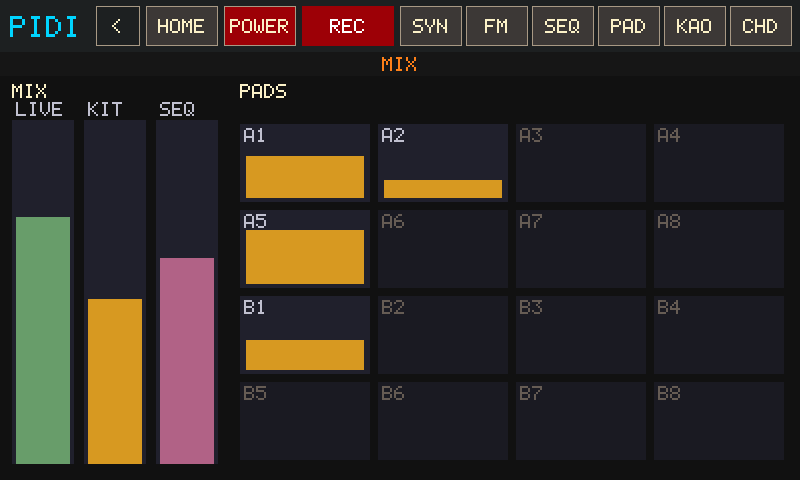
| LIVE | Live keys (KAOSS, SYNTH, CHORDS). Same trim as FX LEVEL / SYNTH LEVEL. |
|---|---|
| KIT | Live drums. Same trim as FX DRUMS. |
| DRM / KEY / KSS | SEQ / song family trims (drums, keys, Kaoss) on engine slots 16–18. |
| MIC | USB mic / line capture onto the master bus. Starts muted. Same fader as FX MIC. |
| A1–B8 | Per-pad clip gain (0.1–2.0). Empty pads are inert. V− / V+ on PADS EDIT writes the same gain. |
SETTINGS
Appliance hub: panic, audio reopen, Wi‑Fi, font, software update, and doors into LOG / MAP.
FX, Wi‑Fi, font, software update, and doors into LOG / PORTS.
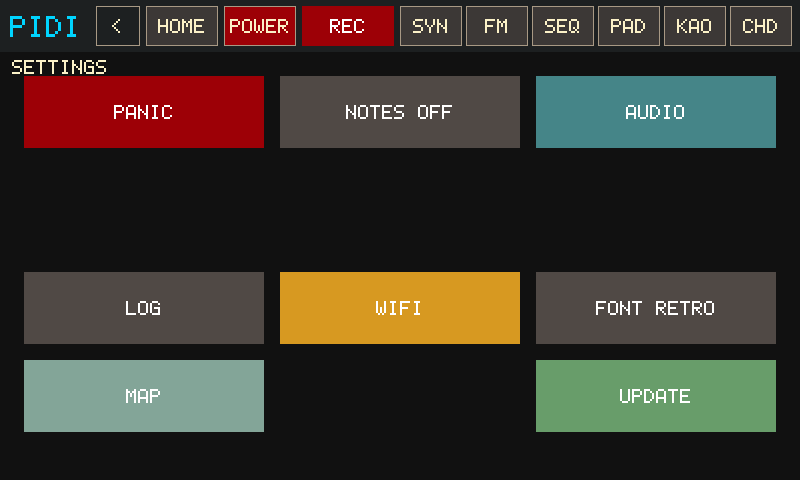
| PANIC / NOTES OFF | Silence everything, or all-notes-off. |
|---|---|
| AUDIO | All-notes-off then reopen the sound device (headphone jack swap). |
| FULL VEL | Force every incoming MPK note-on (keys and drum pads) to velocity 127 so uneven hits stay loud. On by default; saved in the session. Also applies to MAP THRU. |
| LOG / MAP | Engine log, MIDI thru. |
| FX: BUS / VOICE / DRUMS | Which insert the four sliders edit. |
| DRIVE DELAY REVERB FLANGE | Vertical mix sliders. Flanger is also a KAOSS program (X = pitch, Y = mix). |
| LOG / PORTS | Engine log, USB MIDI IN/OUT picker and THRU. |
| PROBE | Toggle a cheap local health log (probe.log): callback µs, xruns, reconnects, load, throttle. Safe to leave on while playing. |
| PWR | Show the LOW PWR / THROTTLE badge when the Pi reports under-voltage. Off by default — the badge is sticky after any sag this boot. |
| WIFI | Join the saved NetworkManager profile or .wifi-credentials. |
| FONT | RETRO bitmap vs SMOOTH TTF. |
| UPDATE | CHECK GitHub master, then overlay the repo and copy committed dist/armv7 onto bin/ (midi-engine, jambox-engine, pidi-native). Does not cargo-build on the Pi. |
LOG
Engine counters plus a short action stream. Opened from SETTINGS → LOG.

| Counters | Callback frames/µs, xruns, command drops, emergency releases, active repeats. SET→PROBE also writes these to probe.log. |
|---|---|
| CLEAR / ALL OFF | Wipe the on-screen log, or panic. |
MAP
Home-screen MIDI utility. Remap any incoming channel onto one or more outgoing channels (1 → 6, or 1 → 6+7, …).

| 1–16 | Input MIDI channels. Tap one to set where it is sent. |
|---|---|
| Subtitle | Smaller numbers under a cell are the output channels that input maps to. |
| Output grid | Multi-select. Empty / CLEAR = pass through the same channel. |
Applies to incoming USB MIDI (local synth) and to THRU once you start it from PORTS.
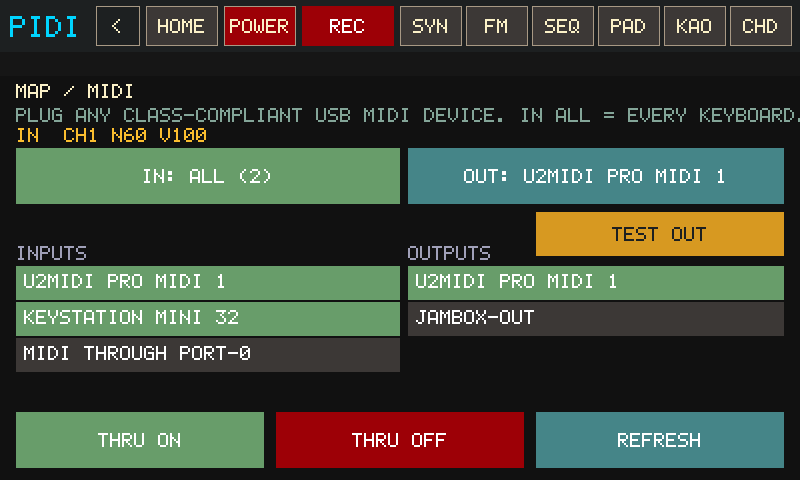
PORTS
Opened from SETTINGS. Class-compliant USB MIDI is plug-and-play; this screen shows what is open and lets you pin a port or start thru.

| IN / OUT | IN ALL listens to every class-compliant USB MIDI keyboard/interface. Tap a row only to pin one device. OUT AUTO = first hardware port. |
|---|---|
| Port rows | Tap a listed input or output to select it. Green = currently open. |
| TEST OUT | Send a C4 on the selected USB/DIN output. |
| THRU ON / OFF | Start or stop midi-engine remap using the MAP channel table (keyboard → hardware synth). |
| REFRESH | Re-list USB MIDI devices. |
On a Windows host these actions explain that they belong on the Pi.
POWER
Kiosk-safe power and burn-in controls.
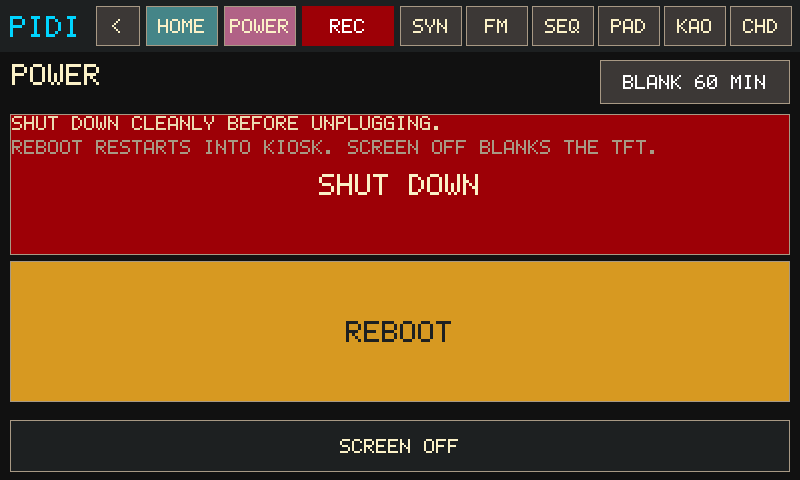
| BLANK timeout | Header control cycles auto-blank (touch-only idle — MIDI does not postpone it). |
|---|---|
| SCREEN OFF | Blank the TFT now. Tap the panel to wake. |
| SHUT DOWN / REBOOT | Power off cleanly, or restart into the kiosk. |
MPK knobs (default mapping)
Factory MPC program (Prog Select → Pad 1) while DRUM MODE / FX targets are off:
| Knob 1 | Morph A→B |
|---|---|
| Knob 2 | Tone / brightness (low-pass) |
| Knob 3 | Attack |
| Knob 4 | Release |
| Knob 5 | Vibrato depth |
| Knob 6 | Vibrato rate |
| Knob 8 | Synth bus level |
On the FX page those eight knobs write punch amounts (RPT → CRUSH). Pads start at zero to match the knobs at rest. Bank A pads toggle the matching punch pads — see Punch-in pads. FX page LEVEL / DRUMS sliders stay the keys vs kit mix. Pitch bend and the mod wheel still affect the voice. Joystick Y is CC1 = vibrato.